
Sitecore
Replace the Sitecore license in Azure PaaS all at once
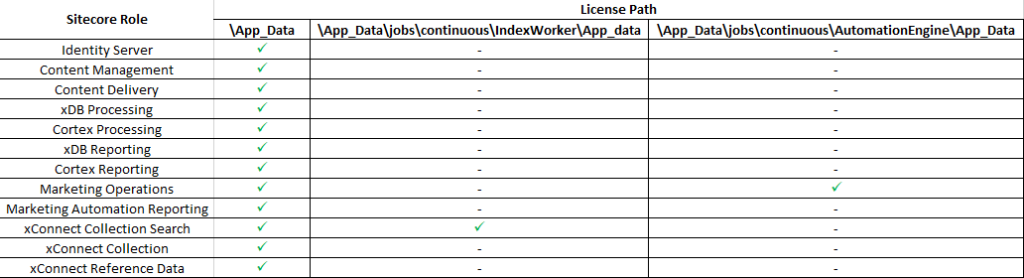
You’ve already gone through changing the Sitecore license either on‑premises or PaaS, and if that’s the case you know how painful it can become, especially for scaled environments and since Sitecore 9 the license path has changed you should be careful to put everything where it belongs to
Yesterday I was told to replace the Sitecore license of Dev, QA, Staging and Prod, and at the beginning I was pretty much like that

After replacing 2 or 3 licenses manually using Azure Advanced Tools (aka Kudu) it felt like

Let’s see if I can find a better way to accomplish this, and I found a Microsoft Powershell script which creates a web app in App Service with its related resources, and then deploys the web app code using FTP. Well, it was a start, wasn’t it?
Then, after some more research, I found an article explaining how to Copy Files to Azure Web App with Powershell and Kudu API
I started to write my own Powershell script, and while looking to address some other questions that appeared during the process I found in SitecoreCloudLabs blog – which unfortunately does not exist anymore – but luckily they kept their Github available.
In order to execute the script you must provide the following
- Subscription ID
- Resource Group Name (where the WebApps were provisioned)
- License Path on your local machine
.\Upload-SitecoreLicense.ps1 -subscriptionId “xxxxxxxx-xxxx-xxxx-xxxx-xxxxxxxxxxxx” -resourceGroupName “myResourceGroup” -pathToLicenseFile “C:\\Temp\\license.xml”
For better transparency, script will print out all the operations of license upload while executing them (Hint: script intentionally performs license replacement only by default not to place unnecessary files)
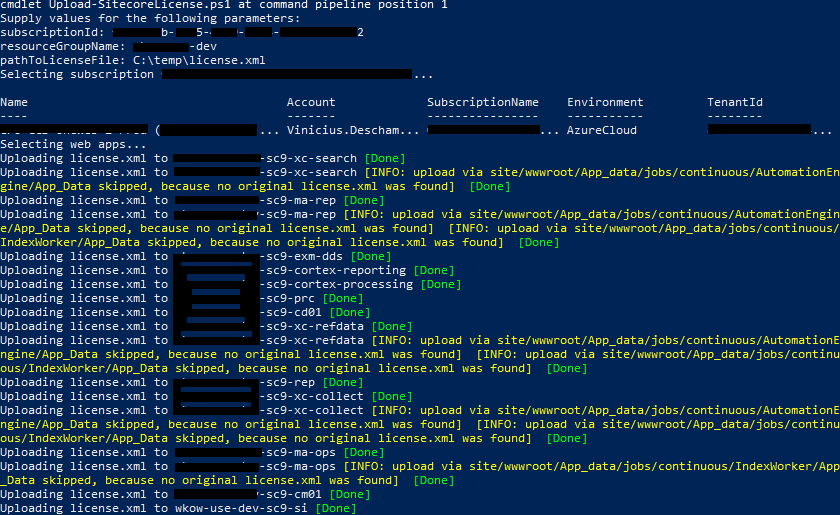
Here is the entire script available on GitHub – https://github.com/fdevelop/Sitecore.Cloud.Labs/blob/master/Upload-SitecoreLicense/Upload-SitecoreLicense.ps1
I wish you enjoyed this script from Sitecore Cloud Labs, and use it from now on!
I hope you liked it, and I’ll see you on my next post.