
Sitecore
Is there an order to install the Sitecore 9 XP1 Topology?
A powershell script to “simplify your installation” is provided by the Sitecore 9 Installation Guide; however, you can use a different approach in which you have to execute every JSON file individually and follow a particular order, which remains my preferred method for now until I better understand the whole process.
After analyzing the JSON files, and posting a question on the Sitecore StackExchange, and dealing with tons of errors during the installations, I decided to create a relation table that would make it easier to determine the requirements of every JSON file, and then establish a proper order.
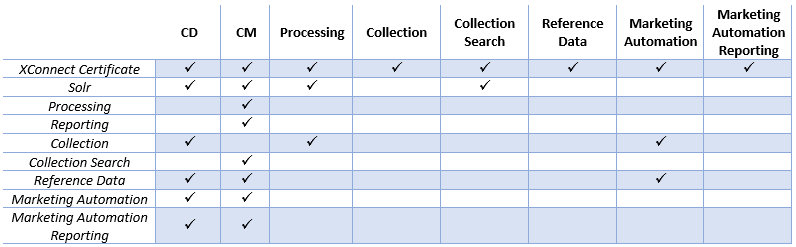
Assuming you already have SQL Server and SOLR in place, and based on the reference table above, I’ve determined the following order to install XP1 topology without getting stuck due to missing prerequisites.
- At the SOLR server, modify and run XConnect-Solr.json and Sitecore-Solr.json
- Create XConnect certificate – I’d recommend downloading the XP0 topology and using XConnect-CreateCert.json for that; check the reason here in Sitecore StackExchange
- XConnect-xp1-collection.json
- **XConnect-xp1-**collectionsearch.json
- XConnect-xp1-referencedata.json
- XConnect-xp1-marketingautomation.json
- XConnect-xp1-marketingautomationreporting.json
- sitecore-xp1-rep.json
- sitecore-xp1-prc.json
- sitecore-xp1-cm.json
- sitecore-xp1-cd.json
I hope this helps you as it helps me!
Also, I’d recommend the following articles to get you asap working with Sitecore 9:
- Setup and basic preparation for Sitecore 9 installation by Toby Gutierrez
- Installing Sitecore 9 to a different location by Artsem Pranshkovich
- How to install Sitecore 9 with the Sitecore Install Framework by George Chang
And last but not least, my special thanks go to my friend João Neto, who just became Sitecore MVP 2018, and the one who provided initial directions in Sitecore StackExchange.
Thanks for reading!
And I’ll see you on my next post.
Photo by Mitchell Luo on Unsplash